Hello, Didactic!
You will work with the Didactic SoC platform in the exercise project. The main task will be to explore and implement your own IP on the platform.
Before anything else, let's clone Didactic and inspect the contents of the SoC. You do not have to make lasting changes to the design yet - the group repository is not yet used in this exercise.
Getting started & notes:
- Open the SoC-courses-vm and activate the SoC Design course environment by sourcing the soc_paths.sh script.
- Clone the Didactic repository from GitHub: Edu4Chip/Didactic-SoC: Template SoC for Edu4Chip
- You can clone it directly in the home folder now, but remember that the contents do not stay between logins.
P drive performance issues
There is nothing that prevents using the P network drive for this exercise, but the performance of P drive has been really terrible recently. Therefore, it's highly recommended to avoid using it.
If you still cloned the repository under shared_p and you find the Questa simulation ending with errors "Unable to open file x", try running make again and see if it goes further.
- Initialize the repository with
make repository_init - If Bender reports conflicts, follow the requirements of Didactic.
1. Simulation
Run the hello world simulation as instructed in the Readme:
- Start the simulation in Questa:
- Run:
- After the simulation completes, you should find the UART output in the file
sim/stdout/uart - Run also other C tests and inspect how they are executed.
student@SoC-courses:~/Didactic-SoC$ make test_all TEST=hello
VSIM 2> run -all
2. Kactus2
- Open Kactus2
student@SoC-courses:~/Didactic-SoC$ kactus2
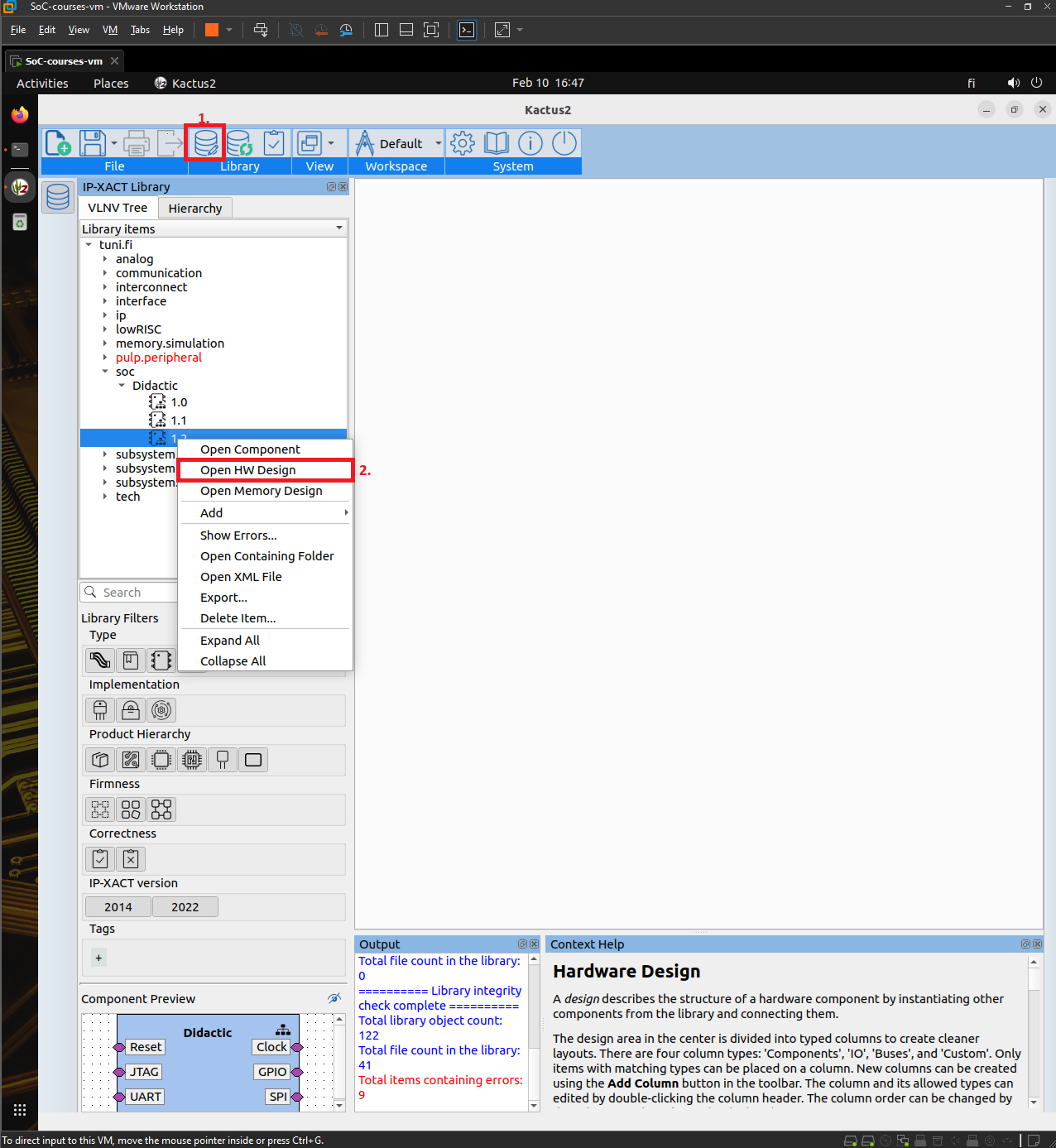
- Add Didactic-SoC/ipxact as a new library.
- Configure Library (1.)
- Open the soc/Didactic/1.2 HW design and explore the contents.
- Right-click -> Open HW Design (2.)
- Navigate deeper into hierarchy by double clicking components
- You can check the Kactus2 tutorials here: Kactus2Tutorial - YouTube
3. Explore
Inspect the rest of the repository and get familiar with it.
4. Questions
Answer the following questions as a group:
Short, concise answers are enough: You should justify your reasonings, but no need to go into details.
- 1. Summarize: What does the Didactic SoC consist of (~one paragraph)?
- 2. What does the Didactic-SoC repository contain in addition to the RTL code?
- 3. If you check the Makefile, the
git submodule updatecommand is commented out from therepository_inittarget. Didactic still depends on other Git repositories — what tool is responsible for managing those and where is it configured? - 4. When you run the "blink" test:
- 4.1. Which C code file is compiled and executed?
- 4.2. Which tools are used in the process when you call
make? - 4.3. Where is that code executed in the Didactic SoC design hierarchy?
- 4.4. What is the mechanism that delivers the compiled code to the CPU in the simulation?
- 4.5. What is
crt0.S? What is its purpose and what does it contain- 4.5.1. .. in general?
- 4.5.2. .. in the Didactic-SoC repository?
- 5. Can you find other verification means in addition to the Questa simulations? What are they, where?
- 6. If you would implement your own IP in the Didactic SoC,
- 6.1. Where would it be in the architecture?
- 6.2. How would you access it from the RISC-V core? Describe the interface.
- 7. Was the readme.md and the other documentation easy to follow? How would you improve it?
- 8. Was the Didactic-SoC HW Design easy to understand in Kactus? What was unclear?
- 9. Have you used Kactus2 earlier?
- 10. What do you expect of the later exercises?
Returning
Return a single .txt file with your answers to the questions:
Earned points
0 / 5
Exercise info
- Assignment category
- SoC Project
- Your submissions
- 0 / 9
- Deadline
- Wednesday, 4 March 2026, 23:58
- Late submission deadline
- Wednesday, 4 March 2026, 23:59 (-100%)
- Group size
- 1-3
- Total number of submitters
- 34